

Short preface. In May 2005, I successfully graduated Kyiv Politechnical Institute with master degree work "Transition mechanism for IPv6 protocol". The main idea there was to start transition from small networks by assigning routable (in future) IPv6 addresses to these networks. After some time, these networks would create more and more pressure on their ISP to enable IPv6 routing between them. Later this would bring big telcos to enable IPv6 on main routers. The way from small networks to big group of interconnected networks – the way to Internet II.
And what do we have now, after 17 years of developing? All we have is 1,690,000 pages, cached by Google with keyword disable ipv6.
And I'm not joking... Of course, number of articles, posts and forum threads with enable IPv6 is 2 times higher. But why so many people are trying to disable Next Generation Internet Protocol? Why to disable protocol, which was designed to make networks bigger, simpler, more reliable and faster (here I mean enhanced routing capabilities of IPv6 protocol - hierarchical address space, which allows to make routing decisions more quickly)? The answer is simple and complicated at the same time. Regular users disable IPv6, because modern software trying to use it in wrong way. Why this happens?
Let’s see. Most of the computers, connected to Internet, are connected to IPv4 part of Internet only. But at the same time, it might be that Operating Systems (OS) of their computers already support IPv6 (and all modern ones do support IPv6). It's not a problem till that time you're trying to make any network connection. Of course, it’s stupid be connected to Internet and not use it. So you’re starting to type www.mib.net.ua in web browser, checking for new emails in your favourite Email client, etc. What happens then? Name resolving – application (browser, Email client) sends request to OS in order to get IP address of desired hostname. Remember, we have OS with IPv4/IPv6 support, so resolver libraries (part of OS, responsible for interaction with DNS servers) requesting IPv4 and IPv6 addresses. Imagine, that DNS returned 2 addresses, like on image below: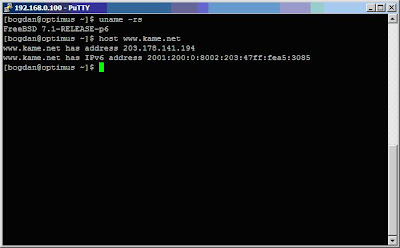
What then? Then we may read RFC2893:
DNS resolver libraries on IPv6/IPv4 nodes MUST be capable of handling both A6/AAAA and A records. However, when a query locates an A6/AAAA record holding an IPv6 address, and an A record holding an IPv4 address, the resolver library MAY filter or order the results returned to the application in order to influence the version of IP packets used to communicate with that node.
…
If it returns both addresses, the application will have the choice which address to use, and thus which IP protocol to employ.
If it returns both, the resolver MAY elect to order the addresses - IPv6 first, or IPv4 first. Since most applications try the addresses in the order they are returned by the resolver, this can affect the IP version "preference" of applications.
Check image above again. As you can see there, this is FreeBSD and it returns IPv4 address followed by IPv6. So application running on FreeBSD will first try to connect using IPv4 address. Usually, this connection will be successful. But if OS returns IPv6 address first, then application will try to connect using it. Since we’re not connected to IPv6 network, connection will fail. But anyway some time will be lost. For user this means slower speed of application. And this speed can be increased by… disabling IPv6. Yes, this is true. If you disable IPv6 on OS level, it won’t request IPv6 address of hostname via DNS. No IPv6 address – no connection attempt via IPv6 network – no loss of time – no speed loss. Yes, so simple and so sad.
More complicated way is to develop software more carefully. It's possible to add IPv6 settings in Configuration menu and allow user to decide - how application should behave if IPv4 and IPv6 addresses returned by resolver. This is done in some applications, like Mozilla, already. Hope that soon this becomes de-facto for all software.
Make Internet smarter - leave a comment :)
9.26.2009
Disable IPv6
9.23.2009
Indoor LTE
NSN claims that they did industry’s first indoor implementation of LTE. This was done by NSN in cooperation with China Mobile Communications Corporation (China Mobile).
The idea was to show how to create excellent indoor coverage for future mobile broadband by using LTE. LTE base station in this case can be truly called Femtocell. This coverage will be widely used by subscribers in future, because "the majority of mobile broadband capacity will be consumed inside homes and offices where coverage is typically lower than outdoor spaces,” said Huang Xiaoqing, General Manager of China Mobile Research Institute.
Research team of Nokia Siemens Networks’ Beijing have demonstrated a live streaming video downlink application using a compact experimental Femtocell prototype in China Mobile’s Research Institute laboratory. The demonstration achieved throughputs which exceed the typical xDSL speed currently possible via residential broadband connections.
The main question, that I have here - which technology to use as IP backhaul for such Femtocells? The main purpose of outdoor LTE is to bring new range of access speeds to customers - speeds that can't be achieved by any of cable technologies at the moment. Plus you're getting mobility - the ability to move where you want and when you want. In case of Femtocell you'll get good coverage inside buildings, but not the speed of LTE (which is main advantage of new technology, as for me), because cell will give the speed of backhaul connection and nothing more.
Also, I suspect that for a long time we're going to have handsets (and other types of access devices) with support of both technologies - 3G and LTE. 3G Femtocells are already available and ready to become very popular in next few years (at the moment vendors, like Ubiquisys, are preparing for upsurge in Femto market). So it looks like this demo is only to show for other vendors and potential customers - "see, we did first LTE Femtocell". My congratulations to NSN - this is great, but it will take years for us to understand the great value of this moment.
You can read official press-release here.
About Nokia Siemens Networks
Nokia Siemens Networks is a leading global enabler of telecommunications services. With its focus on innovation and sustainability, the company provides a complete portfolio of mobile, fixed and converged network technology, as well as professional services including consultancy and systems integration, deployment, maintenance and managed services. It is one of the largest telecommunications hardware, software and professional services companies in the world. Operating in 150 countries, its headquarters are in Espoo, Finland.
9.19.2009
New dialing rules in Ukraine
Ukraine is about to change dialing rules for mobile and fixed networks. Such activity is step 2 in "Program of transition to next-generation numbering plan" (text in Ukrainian is available here)
At the first step, which was done during 3-18 of February 2009, emergency short numbers were changed. Numbers like 01, 02, 03, 04 were used for emergency services in Soviet union and later in independent Ukraine. On February 2009 they were replaced with 101, 102, 103, 104 and so on. This was done in order not to have "0" as first digit in any number.
Next step, which is planned on 14th of October 00:00 by Kyiv (Kiev) time (EEST, GMT+2), contains several tasks, explained below:
1. Changing format of national destination zones from 0XX to XX. Actually, this is formal task, because 0XX codes were used only by humans and not by equipment. Here I should explain further. Soviet union's fixed network used 3 digits codes. International numbers in this case were like +7XXX. Hopefully, all Ukrainian zones got their codes with heading 0 - like 0XX. After Ukraine became independent and got it's own country code (CC) - 380, it was decided to keep first digit of zone code as last digit of country code. For example, international code of Kyiv is 38044, where 380 is country code and 44 national destination code (NDC). But for a long time people treated 044 as NDC of Kyiv. The same was with others cities. So formally all zones already have only 2 digits, but in human's habit 3 digits were used.
Here I suppose, that probably some network elements are using 3 digits also. But as I explained already, formally this was wrong.
2. Changing national dialing prefix from "8" to "0".
Again, some explanation is required here. Since people used to treat zone code as 3 digits (0XX), national dialing prefix was "8". But as I explained before, all zones had 2 digits (XX), so formally prefix was "80".
To understand this, please review an example. Imagine that you want to dial Kyiv's number YYY-YY-YY from another city. For this you had to dial "8" as national dialing prefix, then NDC of Kyiv (which is formally 44, but people continued to use 044) and then subscriber's number. So whole dial looks like:
8-044-YYY-YY-YY
Since correct NDC of Kyiv was (and continue to be) "44", national dialing prefix formally was "80":
80-44-YYY-YY-YY
So actually, on this step national dialing prefix changing from "80" to "0".
3. Changing international dialing prefix from "10" to "00".
Previously, in order to call abroad, "8-10" prefix was used, where "8" - national dialing prefix.
4. Implementing of new zone code for Kyiv's region - "45".
At the moment Kyiv city and Kyiv region are using the same zone code - "44". On second step of transition, Kyiv's region will get it's own zone code. This means that all region's codes should be changed also.
About the country.
Ukraine is a country in Eastern Europe with population of 46.2 millions of people. Fixed phone service is mainly offered by state-owned company - Ukrtelecom, which also has 3G UMTS license and offers mobile services using Utel trademark. Mobile networks are mostly 2.5G, but 3G UMTS and WCDMA are also present.
9.03.2009
MiFi от 3 UK
Mobile WiFi (MiFi), так называется новый сервис от британского оператора 3. Насколько нова услуга и что она из себя представляет, я попытаюсь раскрыть в этой статье.
С 17 Сентября онлайн и с 18 Сентября в 3х магазинах, британский оператор "3" начинает продажи небольшого устройства, которое (по заверениям самого оператора) станет хитом. Технически, устройство представляет из себя обычный 3G-модем со встроенным WiFi. Это позволяет создавать WiFi hot-spot повсюду, где есть покрытие 3G-сети ("3" является саммым большим 3-G оператором в UK). Всё что остается пользователю - включить модем, который автоматически войдёт в 3G-сеть, и затем ввести цифровой код доступа на ноутбуке, мобильном телефоне или любом другом WiFi-устройстве. И всё - вы в Интернет.
Заплатить за такое удобство можно исходя из 2х вариантов:
1. £69.99 (~1000 гривен) за модем + £15 каждый месяц абонплаты за 5GB трафика
2. £99.99 (~1400 гривен) за модем и безлимитный трафик в течении 3х месяцев. После этого можно перейти на любой тариф с оплатой трафика
Как говорит Marc Allera, директор по маркетингу и продажам, "Мобильный WiFi это будущее мобильного доступа в Интернет и мы предоставляем его пользователям по доступной цене. В комплекте с ноутбуком и iPod touch это обеспечит настоящий мобильный беспроводный доступ в Интернет - прекрасный подарок, который окажется во многих списках рождественных покупок в этом декабре".
Если же отвлечьсяя от маркетинга и рекламы, то можно обнаружить, что на рынке уже давно присутствует масса подобных устройств (например это). Правда, цены существенно выше и иногда требуется нетривиальное участие пользователя в настройке. Тут же предлагается безусловно "user-friendly" устройство по невысокой цене, да ещё и с предоплаченным трафиком. Что ж, выбор за вами, вернее за ними :) Нам остаётся ждать, пока что-то подобное и по вменяемым ценам появится на нашем рынке.
Информация о компании.
Название сети: 3
Название оператора: Hutchison 3G UK Limited
Владелец (группа компаний):
Сайт оператора: http://www.three.co.uk
Количество абонентов: 4.4 миилиона в UK и более 20 миллионов по всему миру
MCC: 234
MNC: 20
CC: 44
NDC: более 30 диапазонов
Технология: 3G 2100 (есть HSDPA)